
Strisker Release Notes // October 2026
See what’s new in Strisker: new search and filter options in the Data Center page; watchlist filtering in Signals Tweets and the Writing Section; a topic selector and keyword search for Signals Videos; new buttons in the Watchlists Manager; and the Elected Terms on the Officials feed.

Welcome to your roundup of the latest features and enhancements inside Strisker!
Here’s what’s new and improved to help you stay ahead of short-term and data center regulation changes.
Photo by Lee Campbell on Unsplash

At A Glance 🔽
- The Officials feed on the Sources pages now displays Elected Terms, such as elected date, term start date, and term end date, when available.
- Archive, activate, or share watchlists from Watchlists Manager
- Data Center pages to search by project name and campus size in megawatts (MW) and filter by state
- Filter Signals Tweets and Writing by your watchlist or view
- New topic selector and keyword search for Signals Videos from automated keyword searches
- Signals feeds now feature an improved design and a clearer "No Results" message
- The Documents page has been deleted, and its features have been moved to the Sources page.
This release has introduced significant feature improvements along with several bug fixes to provide a more consistent research experience. Here’s the full rundown:
☰ Search and Filter Data Centers with New Categories
There are now new filter categories on the Data Centers tab that let you search by project name or filter by state.
Searching for a specific data center project? Just type the name of the project you’re looking for.
Need a full compilation of data centers in one state? Narrow the list by your preferred state.
You can also search by campus size in megawatts (MW), so it’s easier to capture the projects that match your research needs.
🔍 Filter Signals Twitter and Writing Section by Watchlist
You can now filter Twitter and Writing by your preferred watchlist or view. Instead of taking time to scan everything in the feed, you can adjust the results based on the watchlist you have already curated for tracking.
In Signals Twitter, you can choose your preferred watchlist to view the latest updates for the locations you are monitoring.
In the Writing Section page, you can find newsletters with the latest reports on regulations from the locations on your watchlist.
◉ New Topic Selector and Keyword Search for Signals Videos
Signals Videos now includes a topic selector and keyword search for videos surfaced through automated keyword searches. Choose the topic or keyword you want to explore and Signals Videos will create a feed focused on that topic or keyword.
🕹️ More Control Over Watchlists Manager
Watchlist Manager now allows you to archive or activate watchlists, enabling lists that are not in use to be stored without deletion and reactivated when needed. You can also share a watchlist directly with someone.
Whether you’re organizing your old lists or involving your teammate, everything is managed with a single click.
💬 Improved "No Results" Messages in Signals
Signals feeds now feature an improved "No Results" message with a new design and suggestions to change your filters to get results.
🗑️Removed Documents Page
The Documents page has been incorporated into the Sources page. Same functionality, now with all the other primary sources we offer.
📆 See an Official’s Elected Terms
An official’s Elected Terms, consisting of the Elected Date, Term Start Date, and Term End Date, are now displayed whenever available.
If an official’s terms are not yet available, no information will be displayed. If there is no term end date, it means it is an open ended appointment.
Additional changes in this release:
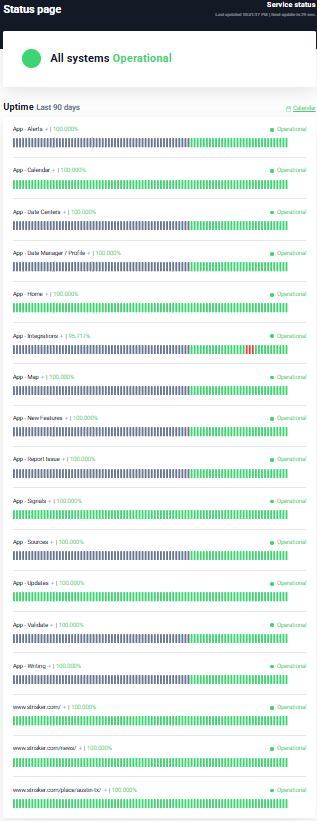
🔋Strisker App Status
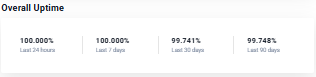
Strisker did not maintain its uptime streak this September.
Over the last 24 hours and the past 7 days, Strisker achieved 100% uptime. It recorded 99.741% uptime over the last 30 days and 99.748% over the last 90 days.
🛠️ Recent Bug Fixes
📍Location filters now use a standardized drop-down menu, making long option lists easier to scroll through.
🎧 Podcast player stays visible while an episode is playing, even if you are browsing other content.
🔄Reset Filter clears every advanced filter across the app with one click.
🔢Updates Tracker search and advanced filters display the total number of records returned.
📍Updates location filter loads new data, shows page numbers, and includes a new topic area filter.
📄The state/province selector in the Watchlists Manager now returns search results.
🚨Signals Facebook shows the correct official name of the locations.
✍️ Writing locations now expand to show all the locations when you click “More”.
🎧 The Episodes feed now keeps the Keywords & Context panel in place as you scroll.
👤 The Profile Locations dropdown now shows the names of locations instead of just the raw codes.
Catch up on previous release notes:
 Em Dela Cruz
 Jas Albatana
 Jas Albatana
Stay Updated with Strisker!
Strisker offers tools and features to keep you updated with the Short Term Rental movement (and now Data Centers!) movement across the world.
📣 We’d Love Your Feedback
Tried one of the new features? Something not working like expected?
Reply to this update or drop me a note - will@strisker.com. We're listening.